
Download Xbox Accessories – Xbox Controller Customization, Firmware Updates, Copilot Mode
Overview
The Xbox Accessories app serves as a powerful companion tool for Xbox console users who seek deeper control and personalization over their gaming peripherals. Designed to enhance the functionality of Xbox controllers, including the standard Xbox Controller, Elite series, and Adaptive Controller, the app empowers users to tailor their gaming experience with precision. Its primary purpose is to provide remote configuration, firmware management, and advanced profile customization, addressing the need for adaptable input devices across diverse gaming scenarios. Whether optimizing for competitive play, accessibility, or cooperative sessions, the app streamlines controller management directly from a mobile device.
Target users include serious gamers, accessibility advocates, and multiplayer enthusiasts who value fine-tuned control. The app enables users to create multiple profiles for different games or playstyles, ensuring seamless transitions between titles without manual adjustments. Real-world use cases include adjusting trigger sensitivity for first-person shooters, enabling Copilot mode for co-op gameplay, or configuring adaptive inputs for players with limited mobility. By centralizing controller settings, the app strengthens the Xbox ecosystem by extending the utility of physical hardware beyond the console itself.
Developed by Microsoft, the app has been part of the Xbox experience since its release on September 17, 2015. Although the developer did not provide additional technical details, its long-standing presence underscores its reliability and integration within the broader Xbox platform. As a utility tool, it plays a critical role in maintaining controller performance and user customization, contributing to a more inclusive and responsive gaming environment.
Key Features & Functionality
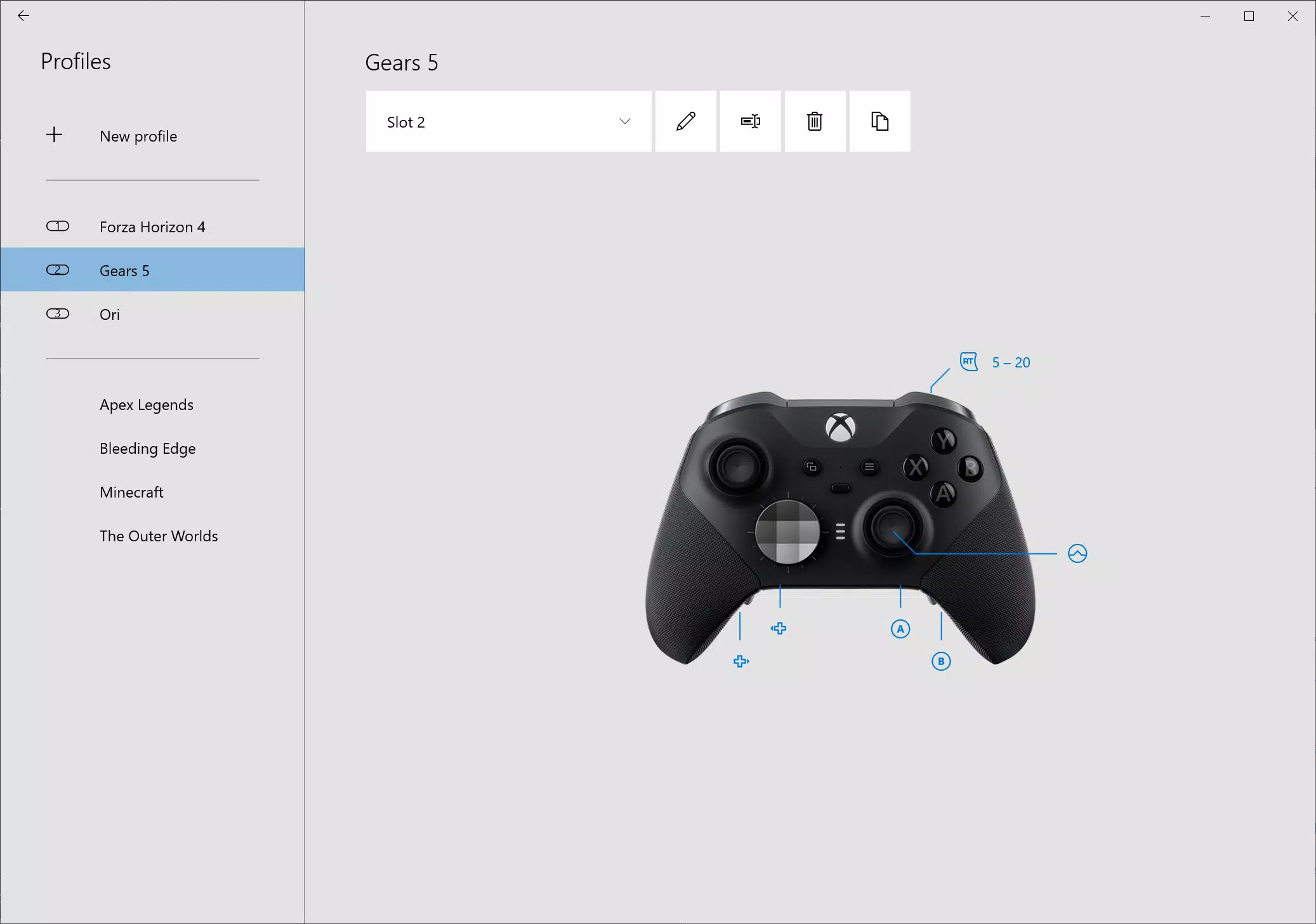
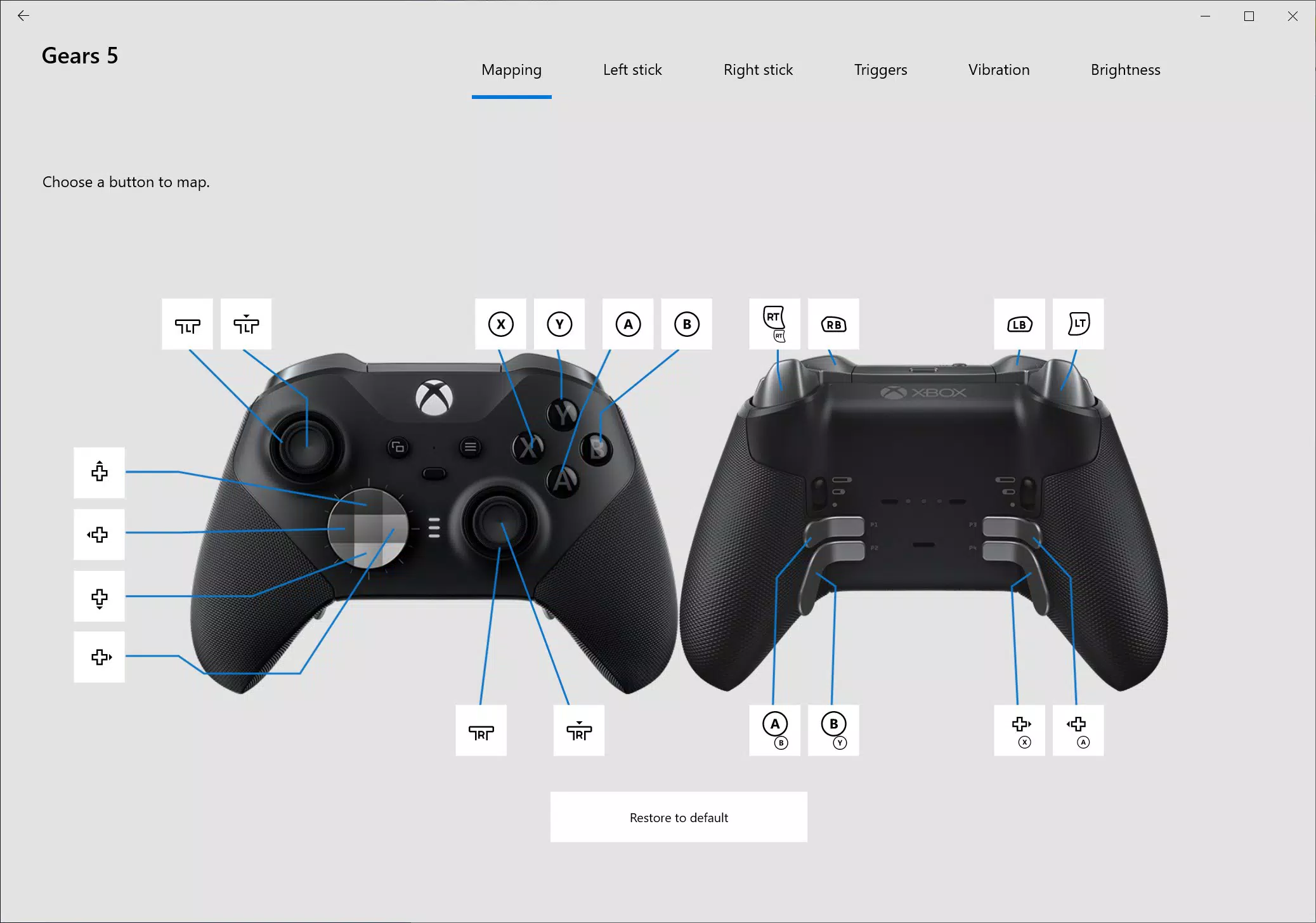
- Customizable Controller Profiles: Create and manage multiple profiles to adapt your controller for different games or personal preferences. Remap buttons, swap stick and trigger functions, and adjust vibration intensity to match gameplay needs.
- Firmware Updates: Keep your controller running at peak performance by updating its firmware through the app. These updates often introduce new features, improve stability, and fix known issues.
- Copilot Mode: Enable cooperative play by linking two controllers as a single input device. This feature simplifies shared gameplay, especially in titles that support split-screen or co-op mechanics.
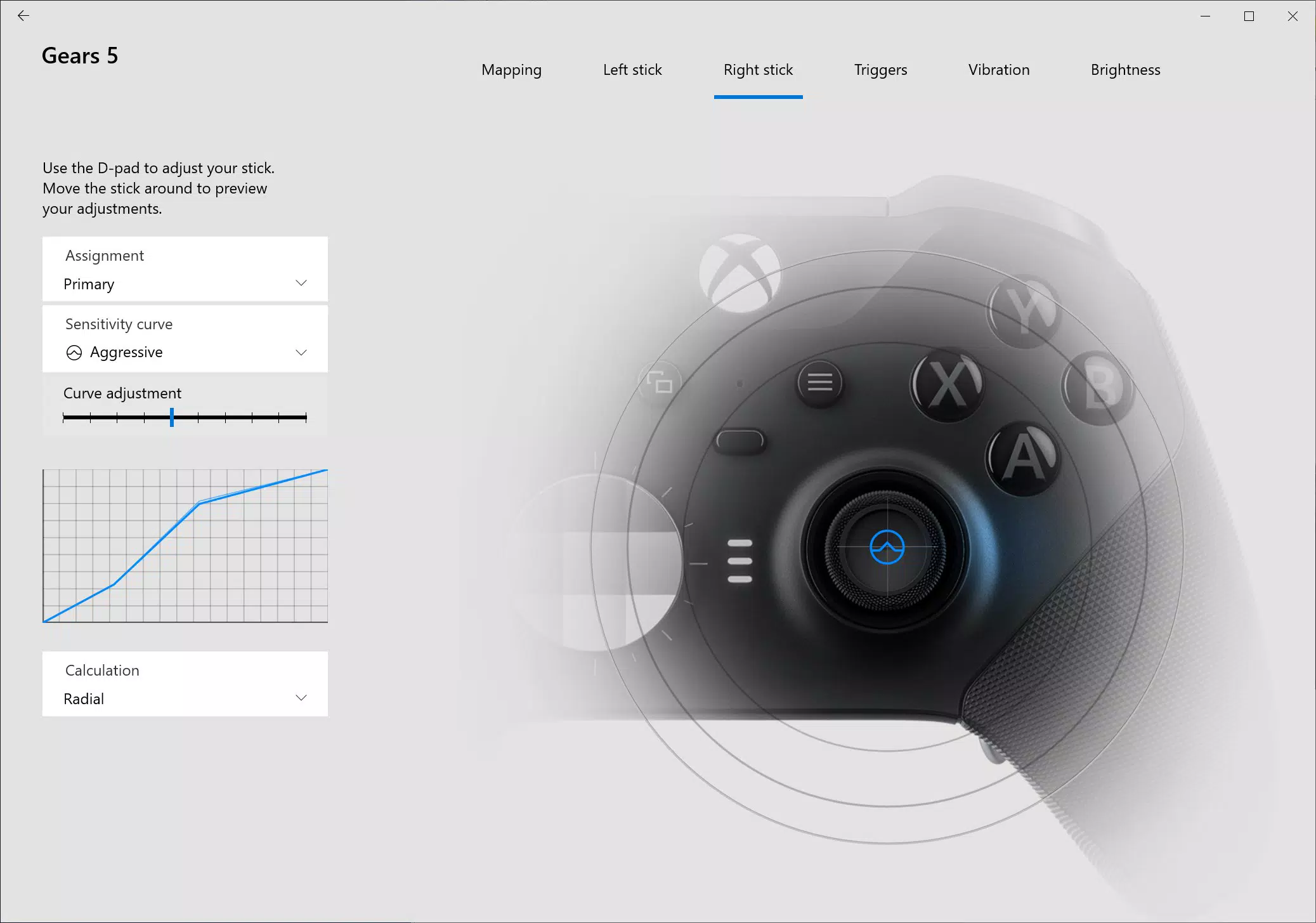
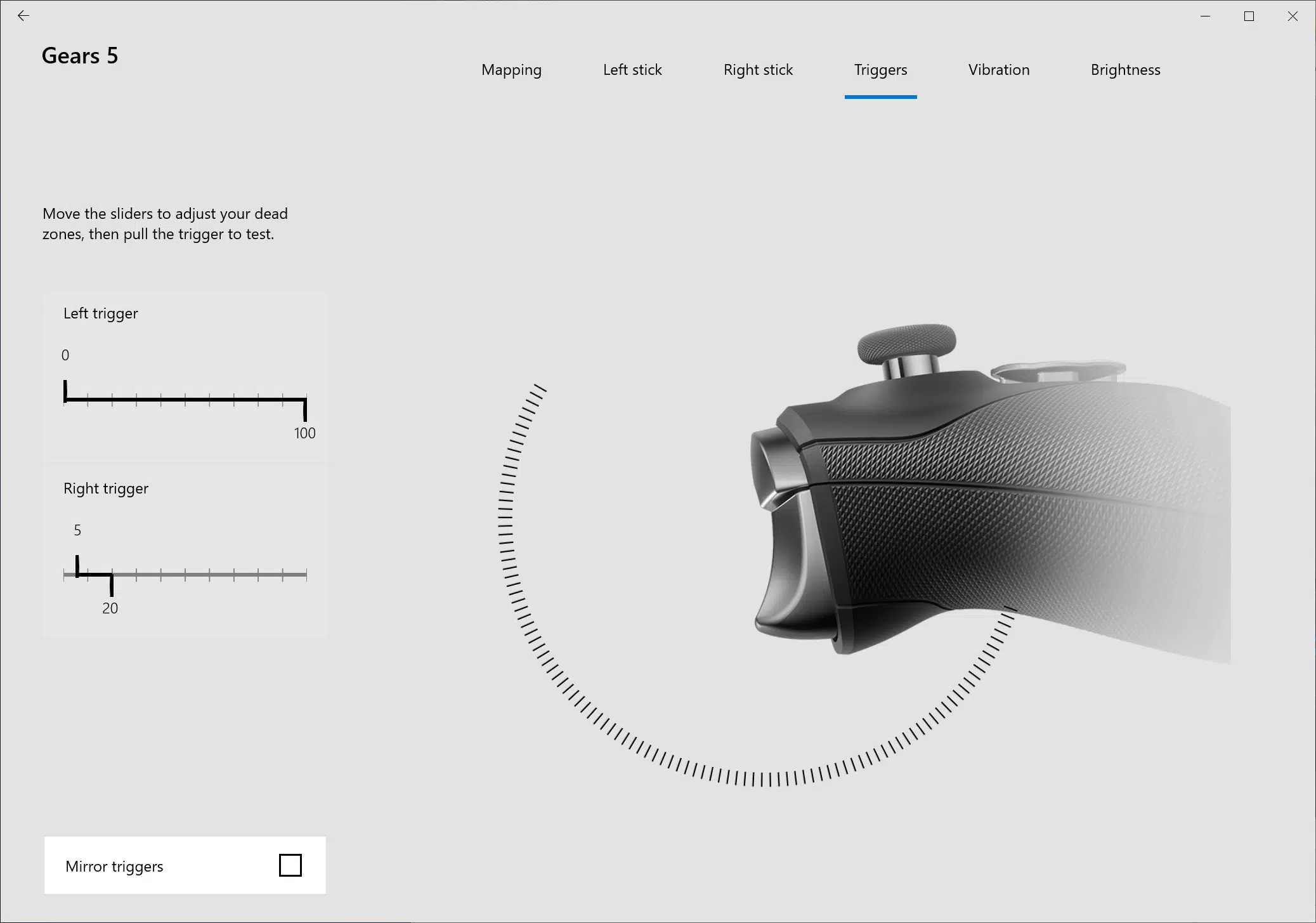
- Detailed Adjustment Options: Fine-tune advanced settings such as trigger dead zones, sensitivity curves, and stick response behavior. Ideal for competitive players seeking precise control and reduced input lag.
- Controller Customization: Rename your controller and store up to 256 configurations within the app. This allows users to maintain a personalized setup across multiple devices and gaming sessions.
For example, a player might create a “FPS Profile” with rapid trigger response and remapped shoulder buttons, while a “Racing Profile” could feature extended trigger pull and analog stick sensitivity adjustments. The ability to switch between these on demand enhances both comfort and performance. The app also supports users with physical accessibility needs by enabling customized input mappings on the Adaptive Controller, promoting inclusive gaming. Each feature is designed to extend the controller’s lifespan and adaptability, making it a valuable tool for long-term users.
Interface, UX & Performance
The app features a clean, intuitive interface that aligns with Microsoft’s design language, emphasizing clarity and accessibility. Navigation is straightforward, with clearly labeled sections for profiles, firmware, and settings. Users can quickly access their connected controllers and make real-time adjustments without requiring technical expertise.
Visual style is minimalistic, using consistent color schemes and iconography to guide users through each function. The layout supports both portrait and landscape orientations, improving usability across different devices. While the developer did not list formal performance metrics, the app operates smoothly during typical usage, with responsive feedback when making changes or initiating updates.
Although the developer did not specify minimum OS requirements or device compatibility details, the app functions reliably on a wide range of mobile devices. Stability is maintained during firmware updates and profile switching, with no reported crashes or data loss. Responsiveness remains consistent even when managing multiple profiles, suggesting efficient background processing. For users managing complex configurations, the interface ensures that settings are saved and applied correctly without delays.
Platform Compatibility & Technical Requirements
The Xbox Accessories app is available on Android and iOS platforms, providing broad accessibility for mobile users. It supports the latest versions of both operating systems, ensuring compatibility with current smartphones and tablets. The app’s file size is approximately 30.2 MB, making it lightweight and suitable for devices with limited storage.
Specific requirements were not listed. The developer did not specify minimum OS versions or hardware capabilities. However, based on its release date and ongoing updates, the app is designed to function on modern devices. Users should ensure their mobile device is running a recent version of Android or iOS to access all features. Compatibility information was not fully disclosed, so installation may vary depending on individual device configurations.
Pros and Cons
- Comprehensive controller customization options
- Supports multiple controller models including Elite and Adaptive
- Firmware updates ensure long-term performance and feature access
- Enables Copilot mode for cooperative gaming
- Stores up to 256 configurations for personalized setups
- No official support for Windows Phone or legacy devices
- Requires a Bluetooth connection to the controller
- Some advanced features may require specific controller models
- Developer did not disclose detailed system requirements
- Interface may feel basic compared to modern design standards
FAQ
Is the Xbox Accessories app free to download?
Yes, the app is available at no cost on both Android and iOS platforms. There are no in-app purchases or subscription fees.
Can I use the app with any Xbox controller?
The app supports standard Xbox Controllers, Elite series models, and the Adaptive Controller. Compatibility may vary based on the controller’s firmware and Bluetooth capabilities.
Do I need an internet connection to use the app?
An internet connection is required only for firmware updates. Basic profile management and controller adjustments can be performed offline after initial setup.
How do I update my controller’s firmware?
Connect your controller via Bluetooth, open the app, and navigate to the firmware section. The app will check for available updates and guide you through the installation process.
Is the app safe to install on my smartphone?
Yes, the app is developed by Microsoft and distributed through official app stores. It does not request unnecessary permissions and is considered secure for use on Android and iOS devices.
Final Thoughts
The Xbox Accessories app stands out as a must-have utility for any Xbox user serious about optimizing their gaming setup. With robust customization, reliable firmware management, and support for inclusive play through Copilot and Adaptive Controller integration, it delivers tangible value across diverse user groups. Whether you're a competitive player refining your input response or a family member sharing gameplay with a friend, the app enhances both functionality and enjoyment.
Its ability to store hundreds of configurations and adapt to different gaming contexts makes it a long-term investment in your controller’s performance. While the interface may lack modern polish, its core functionality remains strong and dependable. For users seeking control, consistency, and personalization, the app is a cornerstone of the Xbox experience.
Download Xbox Accessories now


